



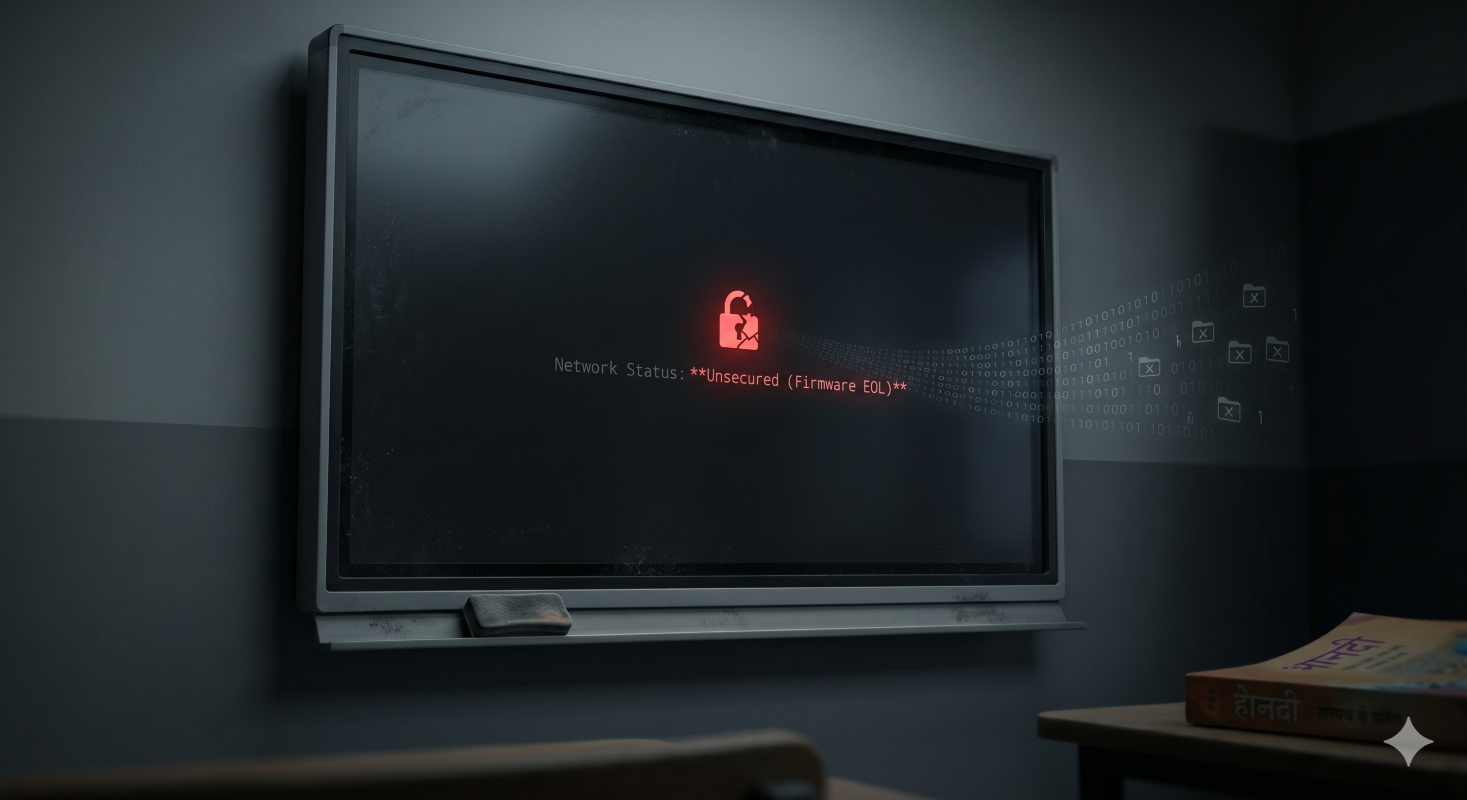
In any well-funded educational institution, you will likely see heavily fortified administrative offices with enterprise-grade firewalls and strict access controls.
Now look inside the actual classrooms. The oldest and most vulnerable piece of hardware on the entire campus network is often an aging interactive panel.
During the rapid push for digitalization over the last decade, schools invested heavily in first-generation interactive flat panels and projectors. Today, those devices might still turn on and display a presentation perfectly well. This creates a false sense of security for school management boards and IT directors.
Functional hardware does not equal secure hardware.
When you connect a seven-year-old display to a high-speed 2026 network, you might expose your entire institution to severe risks. Legacy devices lack the internal architecture required to block modern cyber threats. They serve as forgotten, unsecured bridges directly into your central databases.
This guide breaks down the invisible operational, legal, and financial vulnerabilities hidden inside legacy classroom hardware. It also outlines the urgent steps school leaders must take to secure their campus infrastructure.
How Do Outdated Classroom Displays Affect Student Data Privacy
Hackers do not need to launch complex attacks against your secure central servers. They look for the path of least resistance. In a modern school, that path is usually a legacy display panel sitting unattended in a classroom.
Here is how outdated classroom displays affect student data privacy and expose your campus.
1. End-of-life Software Patches Leave Networks Open
Software companies constantly discover and fix security holes in their operating systems. They push these critical fixes to users through regular network updates.
Eventually, manufacturers stop supporting older hardware models. When a device reaches its end-of-life phase, it stops receiving these critical updates permanently.
If your classroom technology runs on an unsupported operating system, every newly discovered software bug becomes a permanent threat. These unpatched flaws act as an unauthorized network access backdoor for anyone with basic malicious intent.
2. Unencrypted Local Storage Exposes Teacher Logins
Modern computing devices scramble data so that unauthorized users cannot read it. This standard process is known as data encryption.
Older interactive projectors and early-generation touch displays rarely included robust encryption standards. This becomes a massive risk when teachers log into their cloud drives on a shared digital board in the classroom.
Due to complete data encryption failure in older processors, educator credentials and cached files remain stored in plain text on the local hard drive. Anyone who turns the device on after hours can extract this sensitive information.
3. Unpatched Operating System vulnerabilities Invite Intruders
Your IT department likely upgraded your school Wi-Fi to the latest WPA3 security protocols. However, a legacy smart board for classroom use simply does not have the physical hardware to process modern encryption handshakes.
To keep the old board connected, IT admins often have to downgrade network security settings for that specific classroom.
This creates a weak link in your digital perimeter. Unpatched operating system vulnerabilities on these older boards provide an easy entry point for external threats. Once a hacker accesses the old board, they can pivot laterally across your network to target central administration files.
The Financial and Legal Threats of Legacy School Tech Infrastructure in India
The conversation around aging classroom technology is no longer just an IT problem. It is a critical issue for the board of trustees and school owners.
Ignoring the vulnerabilities of old tech in the classroom puts the financial survival and reputation of the institution at risk.
1. Secure DPDP Act Compliance For Schools
The Digital Personal Data Protection (DPDP) Act of 2023 fundamentally changed how Indian schools must handle student information. Educational institutions are now legally classified as data fiduciaries.
You bear full legal responsibility for protecting student names, academic records, and behavioral data.
If an outdated piece of classroom technology leads to a student information system data breach, the financial penalties are catastrophic. The DPDP Act allows for penalties running into crores of rupees for negligent data handling. Ensuring strict compliances with digital technology in the classroom for Indian schools is now mandatory for institutional survival.
2. Why Functional Hardware Does Not Mean Secure Hardware
It is understandable that school leaders want to maximize the life of their original hardware investments. They refuse to replace older smart classroom equipment because the screen still physically functions.
You must separate the concept of visual utility from digital security. A display can show a crisp image while actively leaking data in the background.
Consider this comparison to understand the true cost of aging classroom technology.
Why Fragmented Tech in the Classroom Creates Invisible Backdoors
Traditional campus digitalization often happened in chaotic phases. A school might buy a projector one year, an external camera the next, and a cheap casting dongle later.
This piecemeal approach to digital technology in the classroom multiplies your institutional risk surface exponentially.
Every time you connect a third-party accessory to an older display panel, you create a new potential vulnerability. Cheap external casting dongles are notorious for weak security protocols. They allow any device within physical proximity to hijack the screen and cast inappropriate content.
Open and unsecured USB ports on fragmented setups are another massive threat. Students or unauthorized staff can plug in an infected flash drive to an old board.
Because the outdated classroom technology lacks modern antivirus definitions, malware instantly infects the device and spreads to the school network. The security risks of old smart boards in schools are magnified when you bolt on mismatched external accessories.
Audit Your Smart Classroom Equipment Before the Next Academic Cycle
Management boards must take proactive steps before a data disaster occurs. You need to instruct your IT administrators to conduct a stringent, objective audit of all current classroom technology.
Do not wait for a breach to discover that your equipment was obsolete. Use this specific three-step checklist to evaluate your current classroom technology.
1. Inspect the Firmware Update History
Firmware is the foundational software programmed directly into your hardware. Ask your IT team to pull the update logs for every digital panel on campus.
If the last successful firmware update was more than two years ago, that device is an active liability.
Manufacturers stop updating firmware when they can no longer guarantee the security of the hardware. Continuing to use these abandoned devices exposes your students to known, documented cyber threats that hackers actively exploit.
2. Test for Modern Wi-Fi Security Compatibility
Request a detailed network topology report from your IT department. You need to know how your classroom technology connects to the internet.
Check if your older boards are forcing your network routers to run on outdated WPA2 or even WPA protocols.
If your devices cannot support isolated Virtual Local Area Networks (VLANs), they should be retired immediately. Secure schools ensure that classroom devices sit on a completely separate network from the main administrative servers handling financial and student data.
3. Review Local Network Access Permissions
Walk into an empty classroom and turn on the digital display. What can you access without typing in a password?
Older classroom technology often boots directly into an administrative state. This means a curious student can access network settings, view cached files, or change connection parameters without any authorization.
Modern educational hardware requires strict role-based access controls. Teachers should have to authenticate their identity before the board connects to cloud storage or school databases.
Transition to a Secure Digital Classroom Setup for Schools in India
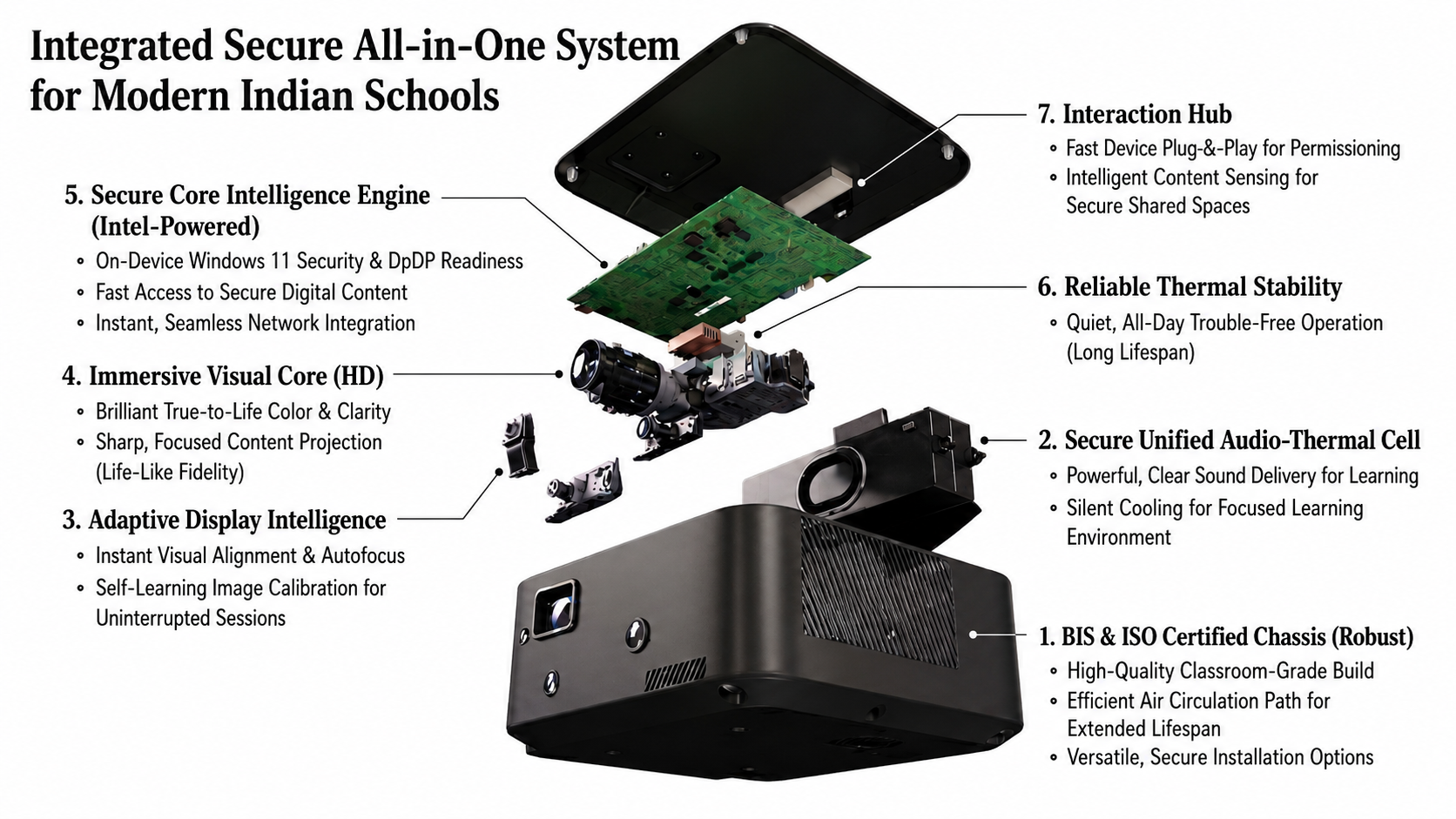
Alt text: Roombr all-in-one smart classroom device with exploded hardware view and integrated system features.
Replacing vulnerable legacy systems requires a strategic shift. You cannot simply swap an old display for a slightly newer retail television and expect better security.
Schools need purpose-built, institutional-grade architecture designed for modern compliance. This is where the Roombr ecosystem transforms campus infrastructure.
1. Eliminate Vulnerable Cables With Walltop Computing
Roombr eliminates the severe risks of fragmented, piecemeal setups. It introduces a revolutionary Walltop computing model that consolidates everything into a single, highly secure device.
You no longer need to worry about rogue casting dongles or unsecured external webcams.
By integrating the computing power, interactive projection, and secure connectivity into one tamper-proof unit, Roombr drastically reduces your physical attack surface. There are no vulnerable cables or mismatched operating systems for hackers to exploit.
2. Process Data Locally With Advanced Built-In Engines
One of the biggest flaws of older classroom technology is its reliance on third-party cloud apps to process basic interactions. This sends sensitive educational data off your campus network.
Roombr solves this by utilizing powerful Intel i5 and i7 processors running on secure Windows 11 architecture.
This robust edge computing power means complex tasks and digital lessons run locally on the device. Data stays secure within your classroom walls. You can seamlessly integrate these secure local lessons into the comprehensive Roombr Learn application environment without exposing your network to outside servers.
3. Ensure Compliance With BIS Certified Integrated Hardware
When you invest in new classroom technology, you must ensure it meets the strictest national standards. Retail flat panels and cheap imports rarely pass rigorous institutional audits.
Every Roombr device is engineered to align with the strict compliance frameworks established for academic institutions across India.
The entire ecosystem boasts rigorous ISO and BIS certifications. The integrated dual 8MP cameras and secure RF microphones operate on a closed-loop system, ensuring complete privacy during hybrid sessions. By upgrading to Roombr, schools and colleges instantly shield themselves from the legal and financial threats associated with modern data privacy laws.
Final Thoughts on Securing Your Campus
The era of treating a digital display like a simple television is over. Every piece of classroom technology connected to your school network is either a secure tool or a dangerous backdoor.
Holding onto outdated digital boards to save a fraction of your budget is a miscalculation that could cost your institution its reputation and financial stability. Outdated software, failing encryption, and unpatchable vulnerabilities are invisible threats that require immediate action.
Protect your students, secure your data, and future-proof your campus by auditing your legacy devices today. By choosing integrated and secure hardware, you can confidently support your educators while ensuring your institution stays fully protected in the digital age.
Secure Your Campus Infrastructure With Roombr
Protecting student data should never mean compromising on the learning experience. Roombr—the world’s first patented Walltop Computer—replaces fragmented legacy setups with a highly secure, all-in-one plug-and-play device. By turning any wall into an interactive screen up to 200 inches, we deliver an immersive, life-like classroom experience powered by secure Intel processors and a robust Windows 11 architecture.
Our integrated ecosystem is both ISO and BIS-certified, ensuring your institution confidently meets the strict mandates of the DPDP Act of 2023. With military-grade data encryption, secure local storage, and the closed-loop Roombr App, you instantly eliminate vulnerable external cables and unpatched backdoors.
Transitioning to integrated, compliant hardware is a proactive step that protects your students' privacy and gives your leadership team complete peace of mind. Turn your classrooms into safe, future-ready hubs for collaborative learning.
Schedule Your Free Roombr Live Demo Today

Foziya Abuwala
Share
Step Into the future of
Education with Roombr












